All blog
Compliance
Dec 17, 2025
6 Min read

Seller Compliance
Amazon Seller Account USA: Registration, Costs, and Compliance Traps for International Sellers
With Amazon facing a $30 million lawsuit, sellers are in the spotlight. Discover why protecting your account and inventory is more critical than ever.
TL;DR
Creating an Amazon Seller Account in the US is a compliance test rather than a sign-up. Instant deactivation may result from a single misspelling, a mismatched document, or a shoddy setup. This tutorial explains how to properly register, steer clear of identity traps, pass verification, and create a seller account in the US that withstands Amazon's bots.
Your Action Checklist:
Prepare documents (exact match required)
Select your selling plan and billing method
Pass video identity verification
Complete postcard address verification
Avoid common deactivation triggers
Why Most Amazon Seller Account Registrations Fail in the USA
Most guides will tell you that opening an Amazon seller account USA is a simple administrative checklist. They are wrong.
In today’s regulatory climate, hitting "Register" is not just a sign-up process—it is a compliance audit. From the second you submit your application, Amazon’s Identity Verification bots scan for the slightest inconsistency. A missing middle name on a bank statement or a blurry ID photo is enough to trigger an immediate Amazon seller account deactivation status before you list a single product.
Consider Mark. Mark spent six months sourcing the perfect hiking backpack. He had his inventory ready, his photos taken, and his capital lined up. He sat down to open his Amazon account. He typed his name, uploaded his driver’s license, and hit submit.
Twenty-four hours later, Mark wasn’t selling. He was staring at a "Deactivated" screen.
Why? He typed “Mark J. Reynolds” in the registration form, but his bank statement read “Mark Reynolds.” His utility bill showed “Mark J.” at “123 Main St.” while his passport and registration details used “123 Main Street.”
To a human, those differences are meaningless. To Amazon’s identity system, there are three different profiles.
That mismatch was enough to trigger a verification failure. The system didn’t ask for clarification. It flagged the account as high risk and halted the registration.
At ave7LIFT, we see this happen to thousands of sellers. The seller Amazon operates on a "Guilty Until Proven Innocent" basis. If their AI cannot verify your identity with 100% certainty, they lock the door. This guide is not just about how to sign up; it is about building a compliant foundation so your account stays open.
Planning to register soon? Don’t let a typo kill your launch. Use the ave7LIFT to run an Exact-Match preflight check (name/address/entity) before you press Register.

What Are The Essential Requirements To Sell On Amazon in the USA?
Before you open the registration page, you must understand the "Exact Match" Rule. This is where Mark failed.
If the "Input" (your form data) does not perfectly match the "Evidence" (your documents), the "Output" is a rejection.
Let's understand how Amazon flags risk. The next sections cover mandatory document matches, recommended pre-checks, and behaviors that trigger fraud risk.
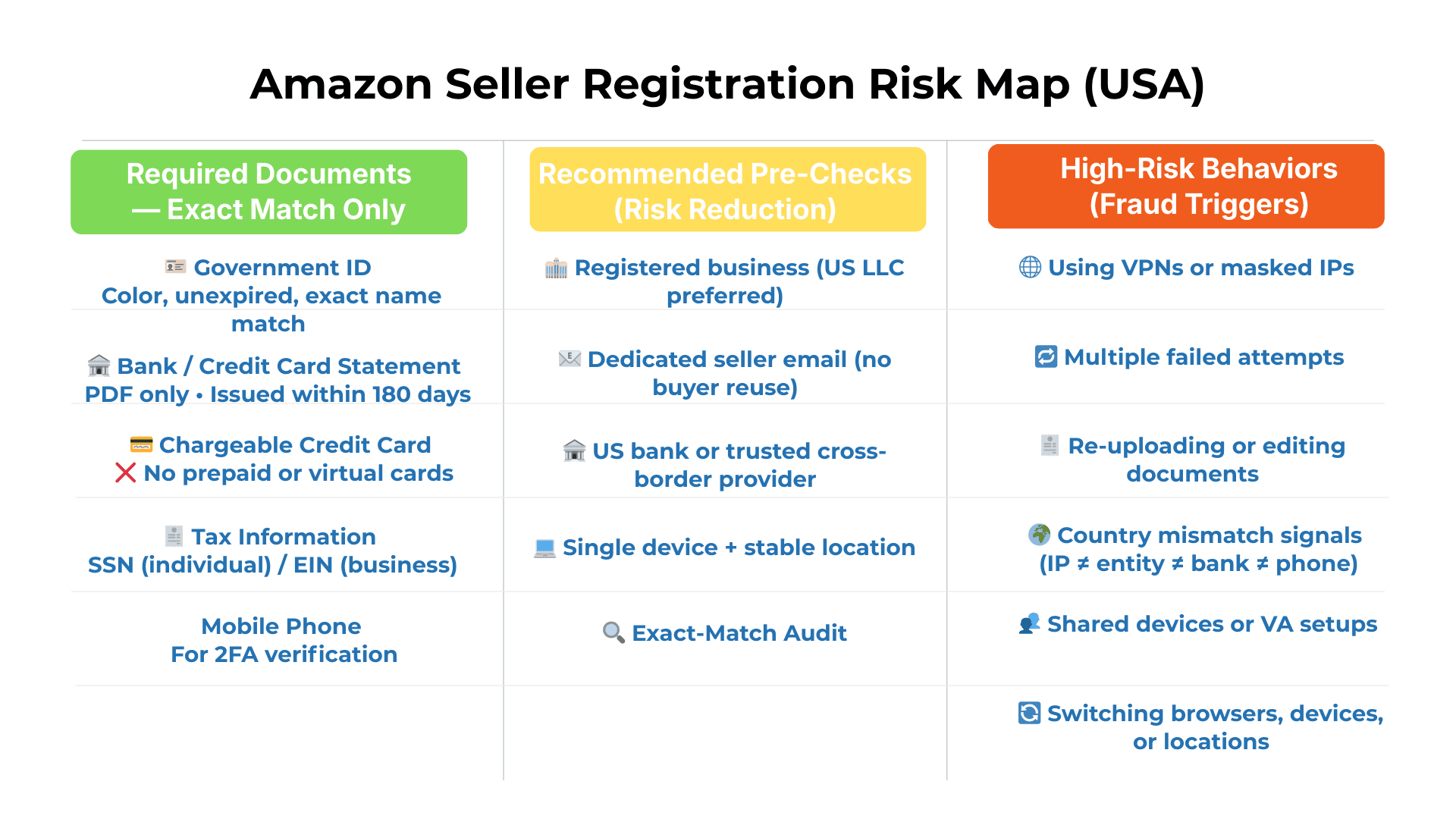
Required Documents: Exact Match Only
To avoid timeouts and IP flags, have these mandatory documents physically on your desk before you begin:
Government-Issued ID: A passport or driver's license. It must be in color, unexpired, and the name must match your registration exactly.
Bank or Credit Card Statement: Must be issued within the last 180 days. Amazon requires the official PDF statement showing your name and address—screenshots of mobile banking apps are automatically rejected.
Chargeable Credit Card: This is required for Amazon to charge subscription fees. Crucial: Do not use a prepaid card or a virtual card. Amazon views these as high-risk and often rejects them immediately.
Tax Information: A Social Security Number (SSN) for US citizens or a valid tax ID (EIN) for business entities.
Mobile Phone: For Two-Factor Authentication (2FA).
Recommended Pre-Checks to Reduce Verification & Suspension Risk
These are not always required on Day 1—but not having them dramatically increases the chance of delays, manual review, or future deactivation.
Registered business entity (US LLC preferred): Creates a clean, consistent document stack under a single legal name.
Dedicated email address for seller operations: Do not reuse a personal buyer account email.
US-based bank account or trusted cross-border provider: Reduces payout delays and name-matching issues.
Single device + stable location for registration: Avoid switching networks or computers mid-process.
Pre-flight Exact Match check: Confirm name, address, punctuation, and entity formatting match across all documents before registering.
Think of this as surgical prep: You can technically skip it—but the complication risk is much higher.

High-Risk Actions That Trigger Amazon Fraud Risks
Most Amazon Seller Account in the USA registrations don’t fail because the documents are “wrong.” They fail because seller behavior during setup trips fraud detection before a human ever looks at the file.
Amazon treats the seller central login creation process like a compliance audit—not a form submission.
Avoid these high-risk behaviors during setup:
Using a VPN or masked IP address: Even “clean” commercial VPNs frequently flag country mismatches.
Multiple failed registration attempts: Each retry increases fraud weighting. Do not “keep trying.”
Editing or re-uploading documents repeatedly: Cropping, renaming, or modifying PDFs mid-process signals manipulation.
Country mismatch signals: Example: non-US IP + US entity + foreign bank + foreign phone number.
Using a VA’s device or shared computer: Shared fingerprints can link accounts before approval.
Switching browsers, devices, or locations mid-registration: Consistency matters more than speed.
Rule of thumb: If Amazon detects instability or inconsistency, your application is silently escalated to manual review—or blocked entirely.
The Individual vs. Professional Difference: If you register as an Individual, Amazon will verify your personal legal name (e.g., Mark Reynolds). If you register as a Business (Professional), you must upload a company registration document (like an LLC formation) that matches the business name exactly. |
Once these foundations are set correctly, choosing between an LLC, SSN, or EIN becomes a strategic decision—not a recovery problem.
Do You Need An LLC To Open An Amazon Seller Account in the USA?
Technically, no. You are not legally required to have a Limited Liability Company (LLC) to start selling on Amazon. You can start as a Sole Proprietor.
However, from a "Defense" perspective, forming an LLC is highly recommended for two reasons:
Liability Protection: If a customer is injured by your product, an LLC protects your personal assets (house, car, savings). As a Sole Proprietor, you are personally liable.
Tax Interview Continuity: When you set up your tax profile in Seller Central, having an LLC allows you to use a business EIN rather than your personal SSN. If Mark had started with an LLC, his business identity would have been distinct from his personal banking inconsistencies, potentially avoiding his initial mismatch. It doesn’t ‘bypass’ verification—it gives Amazon a cleaner, consistent document stack (entity name, EIN letter, bank statement) instead of mixing personal variations.
Do I Need an SSN To Sell On Amazon in the USA?
If you are a U.S.-based seller (citizen or resident alien), yes, you must provide a Taxpayer Identification Number.
Sole Proprietors: You will provide your Social Security Number (SSN).
Single-Member LLCs: You may still need to provide your SSN for the "disregarded entity" status, though you can often use your EIN.
For Non-US Residents: You do not need a US SSN. You can register using your local country’s tax identification number or an Individual Taxpayer Identification Number (ITIN). Amazon validates this data directly against the IRS database (or local tax authority). If the name on your tax ID application does not match the name in Seller Central, the "Tax Interview" will fail, and your selling privileges will be paused. |
Do I Need A Tax ID To Sell On Amazon in the USA?
A Tax ID, specifically an Employer Identification Number (EIN), is issued by the IRS to identify a business entity.
While you can sell with just an SSN, getting an EIN is free (via the IRS website) and acts as a layer of privacy. It prevents you from having to share your personal SSN with suppliers or on public invoices.
The Tax Interview Process: Once you enter the Seller Central login area, you must complete the "Tax Interview." This is a digital form where you declare your tax status.
If you use an EIN, the "Legal Business Name" line must match what is on your IRS CP575 notice (the letter you got when you received your EIN).
Amazon will pause your account setup until this number validates against IRS records, which usually takes 1–4 days.
Can I Sell On Amazon If I Am Not A Business in the USA?
Yes, Amazon offers an Individual Selling Plan designed for casual sellers clearing out their garage or hobbyists testing the waters.
Cost: No monthly fee, but you pay $0.99 per item sold.
Limitations: This plan is restrictive. You are not eligible for the Buy Box (the "Add to Cart" button), you cannot run Amazon PPC advertising, and you cannot access advanced inventory reports.
The "Upgrade" Path: Many sellers start here to save the $39.99/month Professional fee. However, be careful when upgrading later. When you switch from Individual to Professional, it often triggers a re-verification of your identity. If your documents have changed since you signed up, you could face the same suspension Mark did—months after you thought you were safe. |

Can I Use My Personal Amazon Buyer Account to Sell in the USA?
Mark’s first instinct was to click "Start Selling" while logged into his existing Prime account. It seemed convenient—his credit card and address were already saved.
This is a strategic error. While Amazon technically allows you to convert a buyer account into a seller account, mixing your personal purchasing history with your business data is a security nightmare.
Account Conversion vs. Separation of Data
If you upgrade your personal account, your business metrics become entangled with your personal life.
The Risk: If Mark hires a virtual assistant (VA) to manage customer service, that VA also gains access to Mark’s personal order history, credit card details, and home address.
The Compliance Trap: If a household member violates a rule on the buying side (e.g., leaving a malicious review on a competitor’s product), Amazon’s algorithm links that behavior to your Seller Account. The result? A "Section 3" suspension for Code of Conduct violations.
How to Separate Your Business and Personal Amazon Logins
Treat your Amazon business as a separate legal entity.
Create a dedicated business email: (e.g.,
info@marksbackpacks.com) rather than using your personal Gmail.Use Incognito/Private Windows: When you access the seller central login page, use a different browser profile than your personal shopping to avoid cookie overlap.
Security: A separate login allows you to set up Two-Factor Authentication (2FA) on a business phone or authenticator app, keeping your security protocols tight.
Does Prime Membership Give Benefits to the Seller Account?
No. This is a common myth.
Buying Power ≠ Selling Power: Your Prime membership fee ($139/year) applies only to your buying privileges. It does not lower your Seller Referral Fees or give you a discount on the $39.99/month Professional Selling Plan.
Shipping Myth: You cannot use your personal Prime account to ship products to your customers (dropshipping). Using Prime benefits for commercial resale is a direct violation of Prime Terms and Conditions and will get your account banned.
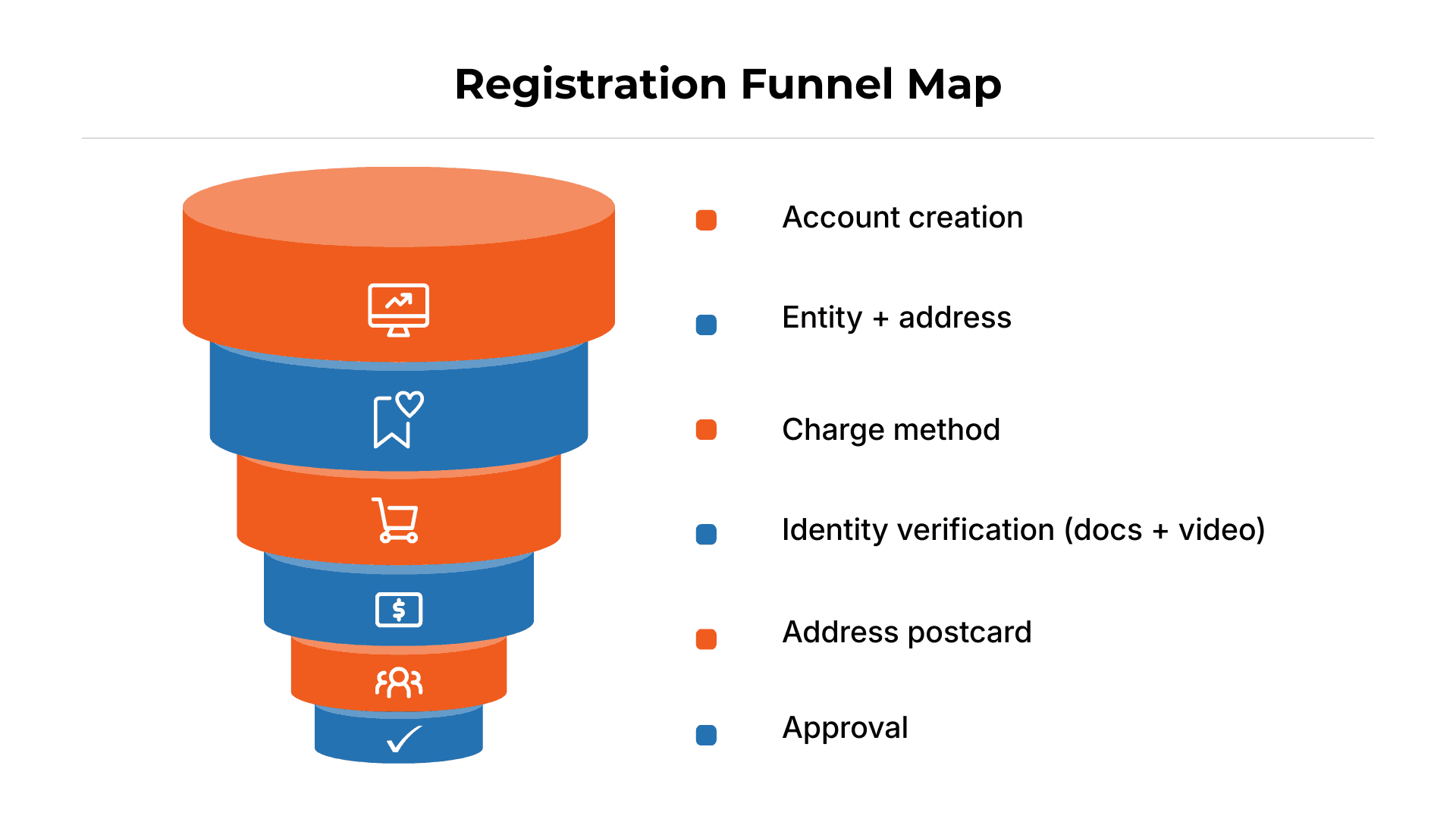
How To Sign Up For An Amazon Seller Account in the USA Successfully?
Once Mark decided to create a fresh business account, he navigated to sell.amazon.com. The Amazon seller account USA sign-up process looks simple, but every field is a test of the "Exact Match" rule we discussed in Part 1.
The Workflow:
Select Marketplace: Ensure you are registering for the North America store (United States, Canada, Mexico).
Business Location: This must match the country listed on your bank statement and utility bill.
Business Type: If you formed an LLC, select "Privately-owned business." If not, select "None, I am an individual."
Identity Verification: This is the gatekeeper. You will upload the ID and Bank Statement you prepared earlier.
Valid Charge Methods for Your USA Amazon Seller Account
Amazon requires a "Charge Method" on file. This is not for them to pay you; it is for them to charge you if your account goes into a negative balance (e.g., due to refunds or advertising costs).
Credit Card vs. Debit Card: Amazon explicitly demands a chargeable credit card. While some sellers scrape by with a debit card, it is risky.
The Verification Charge: Amazon will instantly attempt a small test charge (usually $1.00 or less) to verify the card is active. If this transaction fails (because of a fraud alert from your bank or insufficient funds), the registration bot assumes the card is invalid and pauses your setup.
Mark’s Lesson: Mark initially used a prepaid "virtual" credit card. Amazon rejected it immediately because prepaid cards do not have a verified billing address attached to a line of credit.
Do I Need A USA Bank Account To Sell On Amazon?
You need a "Deposit Method" to get paid.
US Residents: A standard checking account from a US bank works perfectly.
International Sellers: If you live outside the US, you do not need to fly to New York to open a bank account. You can use Amazon’s Currency Converter for Sellers (ACCS) or a third-party payment provider like Hyperwallet, Payoneer, or Wise.
The Compliance Key: Whichever method you choose, the Account Holder Name on the bank document must match your Seller Central Legal Entity name character-for-character.
Completing the Amazon Seller Identity Verification Video Call
After uploading his documents, Mark thought he was done. Then the screen flashed: "Schedule Video Call."
This is the Virtual Interview. It is mandatory for most US accounts to prove that you are a real human and not a bot farm or a fraudulent actor using stolen IDs.
Technical Prep and What to Expect
The Setup: You need a working webcam and microphone. Join the call 5 minutes early. If your connection drops, it can take weeks to reschedule.
Graphic or Block
The Documents: You must physically hold your Driver’s License and Bank Statement up to the camera. The associate will ask you to bend the ID to show the hologram and prove it isn't a photocopy.
Troubleshooting Video Call Scheduling Errors
Sometimes, the scheduler bugs out and shows no available slots.
The Fix: Clear your browser cache or try a different browser (Chrome usually works best).
The Disconnect: If the call drops, immediately check your email. The associate often sends a "reschedule" link valid for 1 hour.
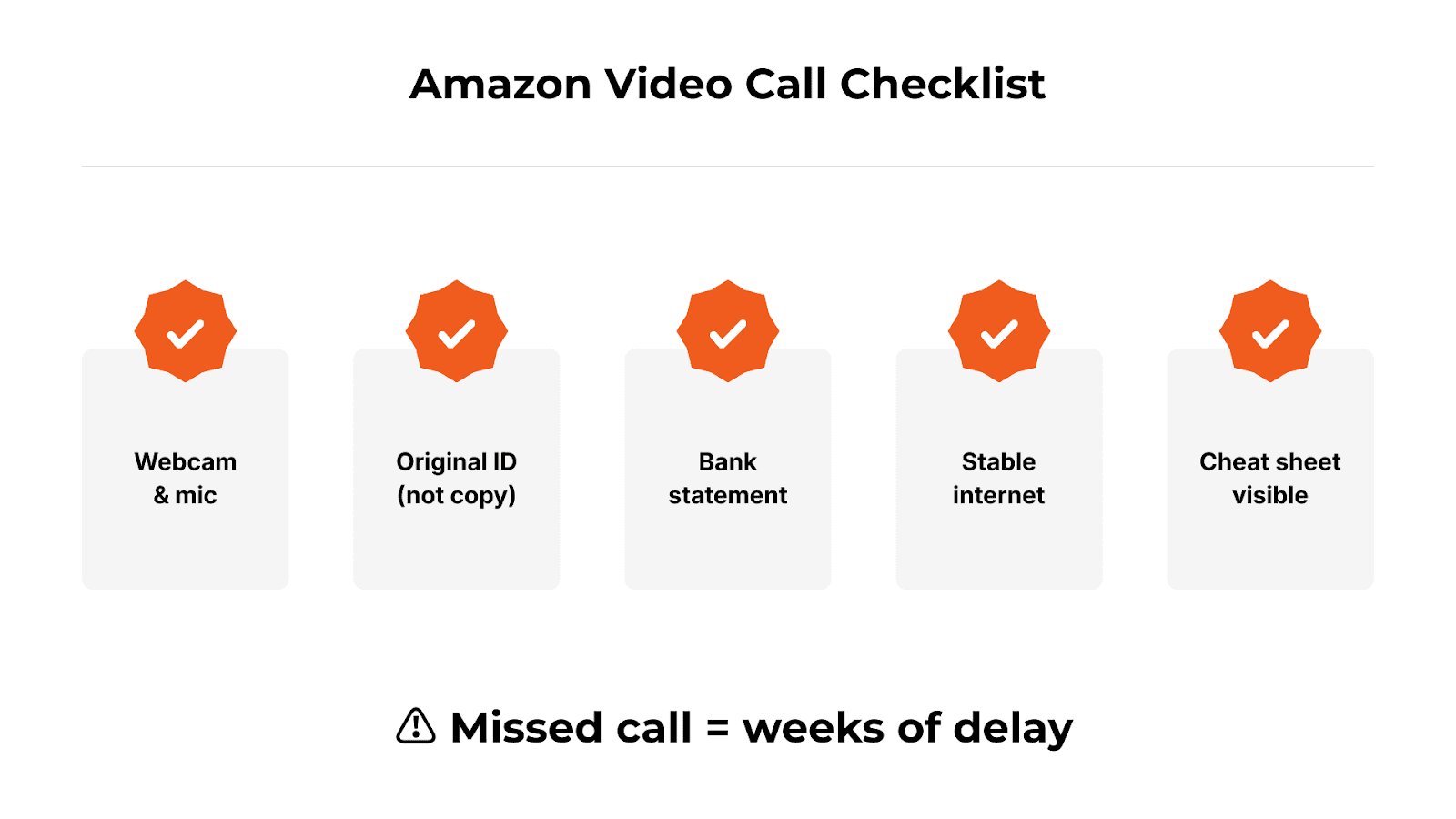
Identity verification issues are increasingly tied to the INFORM Act compliance. Missed deadlines or mismatched documents can freeze payouts and listings without warning. If you need A preventative guide, here is the list of exact documents needed: The Pre-Launch Checklist.
Most deactivations happen here. Don’t risk failing identity verification—use ave7LIFT’s proven checklist to pass on the first attempt. Start with a 30-day free trial of ave7LIFT and protect your seller account.
The Address Verification Process via Postcard for USA Sellers
Identity is verified via video; location is verified via Physical Postcard.
OTP Delivery and Timeline
Amazon will mail a physical postcard to the business address you entered. It contains a specific One-Time Password (OTP).
Timeline: US delivery takes 5–8 business days. International delivery can take 2–3 weeks.
The Trap: You cannot "request" the code via email. It must be physical.
Where to Enter the Address Verification Code in Seller Central
Do not guess the code. If you guess incorrectly three times, the verification creates a "Hard Lock" on your account. Wait for the card. Once it arrives, log in and enter the code in the "Address Verification" banner.
What to Do If Your Amazon Verification Postcard Never Arrives
If 15 days pass and the mailbox is empty:
Verify your address format matches the USPS database (for US sellers).
Request a replacement card in Seller Central.
Ensure your "Business Name" is listed on your mailbox so the mail carrier doesn't mark it "Undeliverable."
Case Study: When a Simple Postcard Nearly Stalled a Seller’s Amazon Journey The actual problem was discovered by ave7LIFT: the postcard could not be delivered since the business name was missing from the mailbox, and the business address did not precisely fit USPS formatting. We made one replacement request, adjusted the mailbox listing, and updated the address. The postcard arrived six business days later. The seller account went live—clean and compliant—as soon as the code was input and verification was completed. |
How Long Does It Take For An Amazon Seller Account To Be Approved in the USA?
If Mark had done everything perfectly, 3 to 7 business days. Because Mark had a name mismatch: 6 weeks.
Instant Approval: Rare, but happens if data matches perfectly and the AI "trusts" your digital footprint - If your identity + address + payment method match cleanly, you stay in automated approval. Any inconsistency bumps you to manual review.
Manual Review: If the AI flags a concern, a human reviews the case. This adds 2–3 weeks to the timeline.
How Much Is The Monthly Fee For an Amazon Seller in the USA?
Professional vs. Individual Plan
Individual Plan: $0 upfront. You pay $0.99 per item sold.
Professional Plan: $39.99/month. This unlocks the Buy Box, PPC Advertising, and API access.
The Break-Even Calculation
The math is simple: If you plan to sell more than 40 items per month, the Professional Plan is cheaper ($39.99 flat fee vs. 40 x $0.99).
Is An Amazon Seller Account Free In The USA?
Creating the account can be free (Individual Plan), but selling is never free. Even on the "free" plan, you must factor in Amazon seller rates, such as:
Referral Fees: Typically 15% of the sale price.
FBA Fees: If you use Amazon’s warehouse, you pay for picking, packing, and shipping.
Closing Fees: Variable costs on media items (books, DVDs).
Does Amazon Charge You For A Seller Account?
Be aware of Storage Fees. If you send inventory to Amazon (FBA) and it sits there without selling, you are charged monthly storage fees. During Q4 (the Holiday season), these fees triple.
Setting Up Sales Tax Settings on Your USA Seller Account
Most sellers think the sales tax setup is an accounting issue. On Amazon, it’s a presence and disbursement risk.
If your sales tax settings don’t align with your legal entity, address, and marketplace configuration, Amazon can flag your account for manual review, delay payouts, or trigger verification loops that halt selling activity.
This commonly happens when:
Your tax interview doesn’t match your registered entity name or country
Marketplace tax settings conflict with your North America Unified Account
Tax information is changed after verification, triggering re-validation
Nexus settings are misconfigured across states
The result isn’t a fine — it’s delayed disbursements, frozen funds, or account review.
Best practice: Complete your tax interview once, correctly, immediately after approval — and avoid unnecessary edits unless legally required.
(Note: We are compliance experts, not tax accountants. Always consult a CPA).
Understanding the North America Unified Account Feature
Why: This matters because Amazon often pushes North America unified enrollment during setup.
The Benefit: You can sell to neighbors easily.
The Trap: If you don't adjust your pricing for currency conversion and international shipping costs, you might sell a product in Mexico at a loss. Mark nearly lost $500 by accidentally selling inventory to Canada without factoring in cross-border fees.
Insurance and Legal Compliance for USA Sellers
Insurance Requirements
You don't need insurance on Day 1. However, once you hit $10,000 in sales in a single month, Amazon requires you to upload a Commercial General Liability Insurance certificate. This policy must name "Amazon.com Services LLC" as an additional insured.
What Kind Of License Do I Need To Sell On Amazon?
There is no "Amazon License." However:
General Business License: Your local city/state may require one.
Category Gating: Some categories (Topicals, Toys, Grocery) require specific invoices or safety certificates to "unlock." This is Amazon’s internal licensing system.
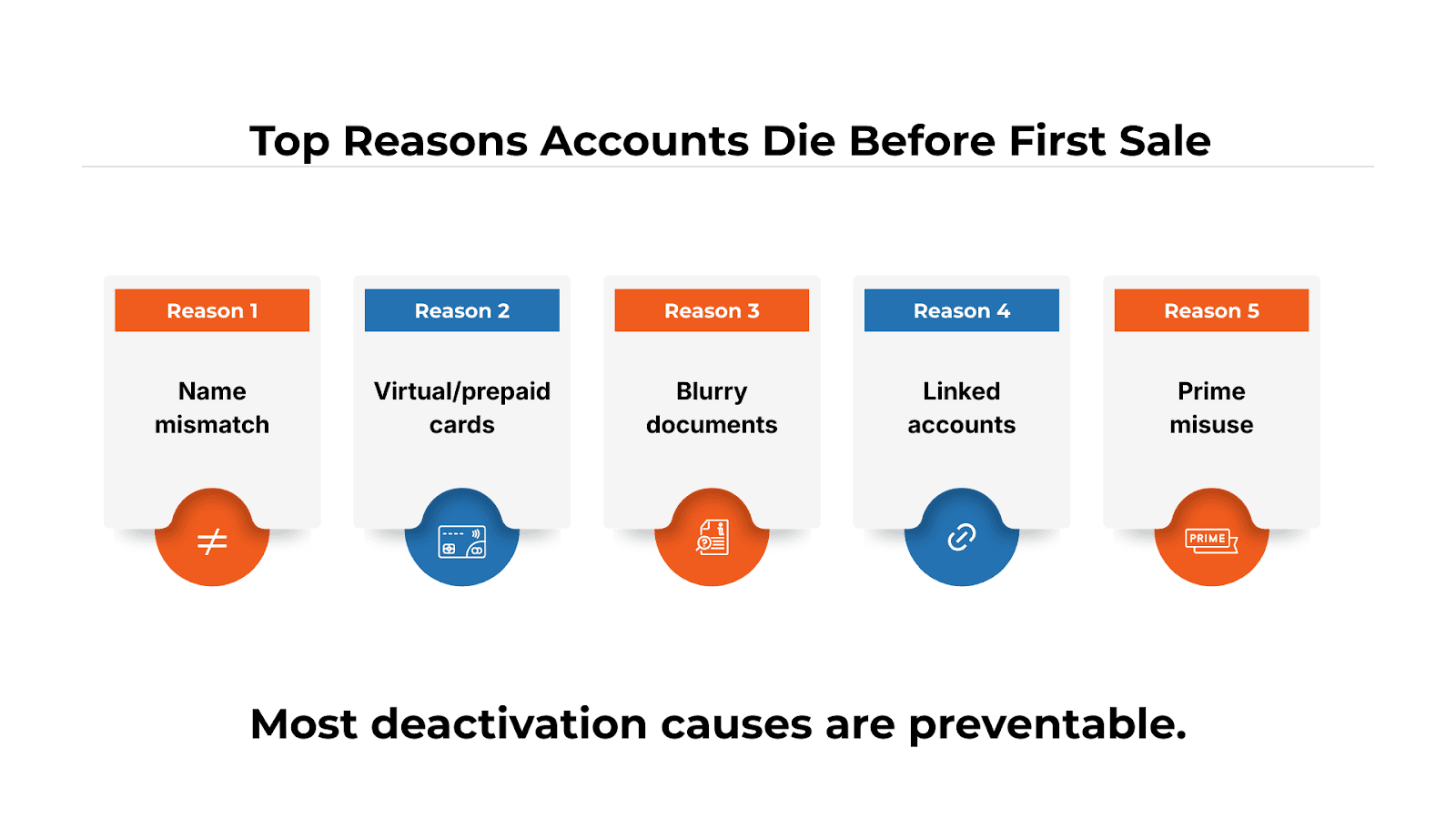
Why Is My Amazon Seller Account Deactivated?
If you followed every step and still see "Deactivated," it usually boils down to:
Section 3 Violations: A catch-all for "suspicious activity" or "dropshipping violations."
Verification Failure: Your documents were blurry, modified, or didn't match the input data.
Linked Accounts: You accidentally logged in from a computer used by a banned seller.
If your account is already suspended or deactivated, follow our step-by-step recovery framework here: How to Recover an Amazon Seller Suspended Account
Stuck in the "Deactivated" loop? If your registration is blocked and you can’t interpret the vague rejection email, don’t guess. Use ave7LIFT to diagnose the specific signal blocking your approval and get a clear path to reinstatement.
Conclusion
Selling on Amazon USA isn’t a lighthearted sign-up—it’s a compliance test. Amazon’s systems don’t evaluate intent; they evaluate data integrity. Mark’s story shows how one small mismatch—name formatting, address shorthand, document quality, or a payment detail—can trigger deactivation before your first sale.
High-volume sellers treat registration like infrastructure, not paperwork. Before they click Register, they separate personal and business identities, enforce the Exact Match rule across every field and document, and prepare for the two biggest gates: video verification and address verification. When your inputs are clean and consistent, approval can take days. When they aren’t, you can lose weeks—and bleed momentum and cash flow.
How ave7LIFT AI helps: ave7LIFT acts like a pre-flight and triage system for your Amazon presence. It helps you detect mismatches before submission, pinpoint what’s likely causing verification failures, and guide you through compliant next steps when Amazon’s messages are vague—so you stop guessing, stop triggering more risk signals, and protect your launch and revenue.
Summary
An Amazon Seller Account USA allows sellers to list and sell products on Amazon.com through Seller Central, but approval is governed by strict presence and compliance requirements, especially for non-US sellers. Sellers must choose between the Individual plan ($0.99 per sale) or the Professional plan ($39.99/month), then complete identity, tax, banking, and payment verification using exactly matching legal information. Required inputs typically include a government-issued ID, SSN or EIN, a chargeable credit card, a valid bank account, and verified contact details.
The setup process includes document review, live video identity verification, and often physical address verification via postcard—all common failure points. Amazon also enforces ongoing obligations such as customer service standards, shipping performance, returns handling, and compliance with US regulations like the INFORM Act, liability insurance thresholds, and approved return addresses.
Most account deactivations occur due to document mismatches, payment failures, or linked-account signals, making precision and compliance critical from day one.
Frequently Asked Questions
More Insights from us